
The diff was one line. compileSdk and targetSdk to 36, a clean Gradle sync, unit tests green, instrumentation green, the release build smaller than the last one. The developer who raised the PR had been on the project two years and had no reason to think it was anything but housekeeping. It went to internal testing on a Pixel 8 and looked perfect.
The field team runs Galaxy Tab A9s. On those, the app's top toolbar sat under the status bar, the save button on the invoice screen sat under the gesture pill, and the whole thing rotated into a landscape layout nobody had ever designed — because the activity had been locked to portrait since 2021 and Android had just decided that lock was a suggestion. Three separate failures, one Gradle line, zero compiler complaints.
That is the shape of this migration. Play stops accepting new apps and updates below API 36 on 31 August, with a one-time extension available to 1 November, and the deadline has pushed a lot of teams into treating it as a version bump on a Friday afternoon. We've now taken four client apps through it. The Gradle work has never taken more than ten minutes. The UI work has never taken less than a week.
One line of Gradle, and nothing to compile against
Here is the entire compliance change, and it is worth looking at precisely because there is so little to look at.
targetSdk is not a dependency version. It is a declaration to the platform that your app has been tested against a set of behaviour changes, and the platform responds by switching those behaviours on. Nothing in your toolchain can verify that claim, which is why the safest-looking line in the file is the one that changes the most.
Three of those switched-on behaviours account for nearly everything we've had to fix. They are worth taking one at a time, because the fixes are unrelated and the QA passes that catch them are different.
Edge-to-edge stopped being a choice
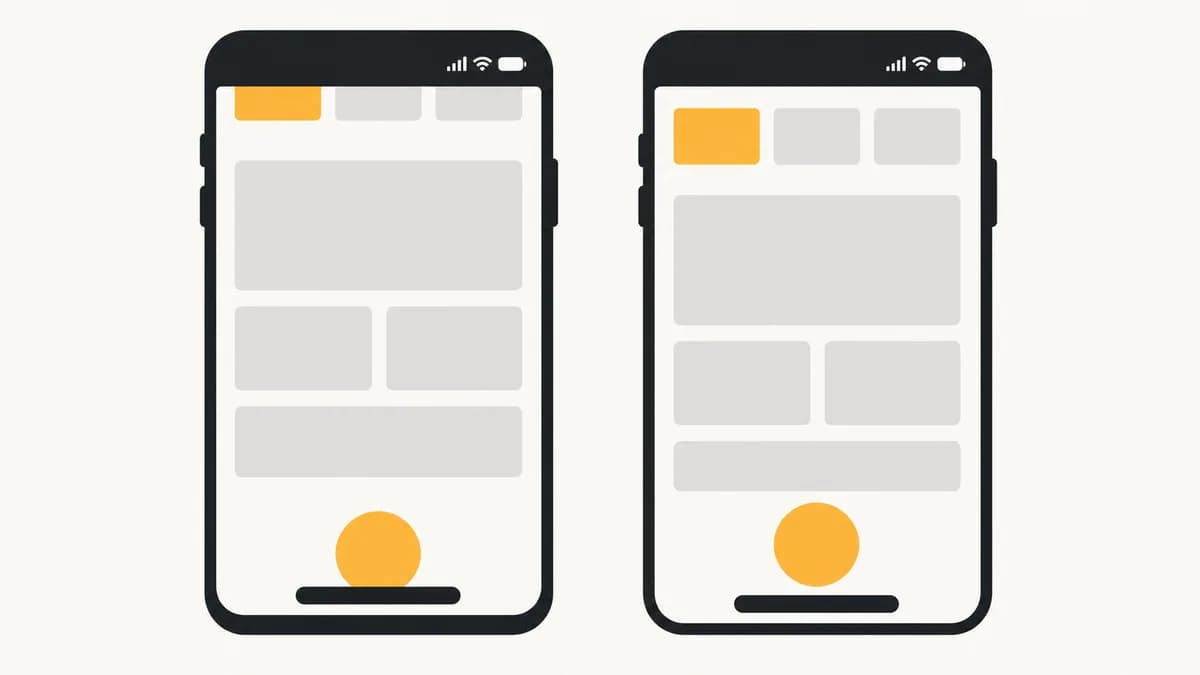
Android 15 made edge-to-edge the default and left a door open: windowOptOutEdgeToEdgeEnforcement in your theme, and everything went back to how it was. A lot of apps walked through that door, including two of the four we migrated. For apps targeting 36 that attribute does nothing at all. Your content now draws behind the status bar and the navigation bar whether or not you have an opinion about it.
The fix is not to find a new opt-out. It is to say, per screen, which parts scroll under the system bars and which parts must never. That is a design decision, and on every project so far it has needed a designer in the room for an hour — a list scrolling under a translucent nav bar looks intentional, a primary action button doing the same looks broken.
That last line is where we lost half a day on the second project. Returning WindowInsetsCompat.CONSUMED from a root listener is the snippet most commonly pasted from Stack Overflow, and it stops the insets propagating to every child — so the outer chrome looks correct and a bottom sheet three levels down goes back to sitting on the gesture pill. Consume only when you genuinely own everything below you, which in a fragment-based app is almost never.
The other quiet one: clipToPadding on scrolling containers. Padding a RecyclerView without it gives you a list that stops short of the bottom of the screen with a dead grey strip underneath, which reads as a rendering bug rather than a layout choice, and which nobody notices in a screenshot taken at the top of the list.
Predictive back turns your back button into a suggestion
Apps targeting 36 get predictive back animations by default. The system starts animating the previous screen into view as soon as the gesture begins, which means it has committed to going back before your code gets a say. Any screen that overrode onBackPressed to intercept the gesture — unsaved-changes dialogs, multi-step forms, custom drawer handling — now runs a handler the system has already moved past, if it runs at all.
This is the change that produced our only genuine data-loss bug in four migrations. A six-step onboarding flow used onBackPressed to step backwards through the form. On targetSdk 36 the back gesture exited the activity from step five and the partially completed application was gone. Nothing was logged, because from the platform's point of view nothing went wrong.
The grep at the bottom is the actual deliverable of this section. Across four codebases it found between four and thirty-one call sites, and the large number was not a badly written app — it was a nine-year-old one with three generations of navigation code in it. Every hit is a screen where someone once decided the back gesture should not do the obvious thing, and every one of those decisions now needs re-making against a dispatcher.
Nothing goes to Play on targetSdk 36 until a screenshot test has run the top twenty screens on a 600dp landscape device with a display cutout, and a manual pass has used the back gesture on every screen that holds unsaved state. Every regression we shipped in this migration was invisible on the phone the developer was holding, in portrait, without a cutout.
At 600dp your orientation lock is a comment
This is the one that surprises people, and it is the one with the widest blast radius. For apps targeting 36, on any display whose smallest width is 600dp or more, Android ignores your requested orientation, your resizability setting and your aspect ratio restrictions. screenOrientation="portrait" in the manifest is still valid XML. On a tablet it does nothing.
For a phone-first app that has never been opened on a tablet, this converts a configuration you controlled into one you have to support. Layouts stretch to widths they were never designed for, single-column forms become 900dp-wide input fields, dialogs that assumed a narrow screen render as thin ribbons, and any screen that reads a hardcoded orientation to decide its camera preview rotation gets it wrong.
- It is not only tablets. A folded-open Pixel Fold, a Chromebook running your APK, and a phone in a desktop windowing mode all clear 600dp. The device you need for this test is probably not in your test lab, and the emulator image is free.
- Configuration changes get real. An app that has only ever been portrait has never actually exercised its rotation path. Every unsaved ViewModel field, every fragment that rebuilds state in onCreate, every camera session torn down and not restored — this is where those show up, all at once.
- There is an opt-out, and it expires. The PROPERTY_COMPAT_ALLOW_RESTRICTED_RESIZABILITY manifest property buys you the old behaviour back for this target level. Google has been explicit that it is a transition aid, not a setting — it goes away at the next one. Use it to buy a sprint, never to close the ticket.
One more thing lands in the same jump for anyone coming from targetSdk 34: elegant text height became the default at 35, which gives taller line boxes in Arabic, Thai and most Indic scripts. If your app ships a Hindi or Tamil locale and has fixed-height buttons or single-line list rows, that clipping arrives in this release too, and it will look like an Android 16 bug because it shipped in an Android 16 update.

The regression matrix, because the emulator won't tell you
None of these failures throw. That single fact should determine how you test this migration: automated checks that assert on behaviour will keep passing, so the coverage has to come from pixels and from a human's thumb. This is the matrix we run now, and it takes about a day and a half for a mid-sized app.
- 1A 600dp landscape screenshot pass. Every screen that can be reached in under five taps, captured on a tablet profile in landscape, diffed against nothing — a human looks at them. You are not looking for pixel drift, you are looking for layouts that were never meant to be this wide.
- 2A display-cutout device, in both orientations. Landscape with a cutout on the left edge is the configuration that catches missing horizontal insets, and it is the one almost nobody runs. Two of our four apps failed here and passed everywhere else.
- 3Gesture navigation and three-button, on the same build. Bottom inset values differ substantially between the two, so a bottom bar that clears the gesture pill can still be overlapped by the button bar. Toggle it in developer settings; it costs seconds.
- 4A back-gesture pass over every stateful screen. Half-complete forms, open bottom sheets, media in the middle of playing, anything with a discard prompt. Swipe back, slowly, from the edge — the slow swipe is what reveals whether the system has already started animating away from a screen you meant to hold.
- 5Rotation on every screen that holds unsaved input. For a previously portrait-locked app this path has effectively never run in production. Type into a form, rotate, and check what survived.
- 6The largest locale you ship. Whichever of your languages has the tallest line boxes, on the screen with the tightest vertical rhythm. One screenshot answers the elegant-text-height question for the whole app.
Worth saying plainly: the internal testing track is not a substitute for any of this. It confirms Play accepts the build, which is the one thing that was never in doubt. Acceptance and correctness are separate questions here, and only one of them has a deadline attached.
If you have four days
Assuming you're reading this the week the deadline lands, the order matters more than the coverage. Bump the target level on a branch this morning and get it onto a real tablet by lunchtime — thirty minutes of tapping tells you whether you are looking at a week of work or an afternoon, and that answer decides whether you request the November extension or ship. Request it early either way; a plan you didn't need costs nothing.
Then fix in this order: back-gesture interception first, because that one loses user data; then bottom insets, because that one hides primary actions; then top insets; then large-screen layout, which is the largest job and the least urgent, since it degrades the experience rather than breaking it. If the extension is in hand, layout work is the part that belongs in October.
The broader lesson is one we keep relearning on the mobile side and it has nothing to do with Android 16 specifically. Platform compliance deadlines are marked in the build system and paid for in the UI, and the gap between those two is where the estimate goes wrong. When a client asks what a target-level bump costs, the honest answer has never been about Gradle. It is: what have we been quietly allowed to assume about the screen, and which of those assumptions expire this year?